
Connect the journey without replacing every system.
PULSE coordinates the operational work around care while authorised clinical, administrative and enterprise systems can remain systems of record.
- Layer 1
Patients and Staff
- Layer 2
PULSE Experiences
- Layer 3
PULSE Modules
- Layer 4
PULSE Core
- Layer 5
PULSE Connect
- Layer 6
Authorised Systems and Providers
One operational journey, end to end.
PULSE maintains an operational journey across every stage of care — so the work around the patient stays connected, owned and visible.
The journey retains
Turn operational need into accountable work.
A Work Item represents something that needs to happen. It carries an action, an owner, a priority and the evidence of what was done.
- Action
- Identity exception requires review
- Owner
- Access Team
- Priority
- High
- Journey
- Outpatient Visit
- Status
- Assigned
- Age
- 14 min
- Escalation rule
- Escalate to lead at 20 min
- Evidence
- Linked to journey event
- Completion
- Requires sign-off
Queues may show where patients are waiting.
Work Items show what must happen next and who owns it.
- Action — what needs to happen
- Owner — who is accountable
- Priority — how urgent it is
- Status — where it is in its lifecycle
- Evidence — proof of what was done
Operational views built on evidence, not assumption.
Operational views should be based on governed events and versioned definitions, with ownership and state changes made auditable.
What views are based on
- Server-authoritative or approved Facility Edge events
- Versioned definitions
- Evidence-linked hand-offs
- Auditable ownership and state changes
- Explicit data-quality states
Designed to support auditable and evidence-led operations.
PULSE does not claim immutable or legally compliant records unless explicitly qualified for a given deployment and jurisdiction.
One journey. Different workspaces.
PULSE gives each participant the information and actions relevant to their role while preserving one connected operational journey.
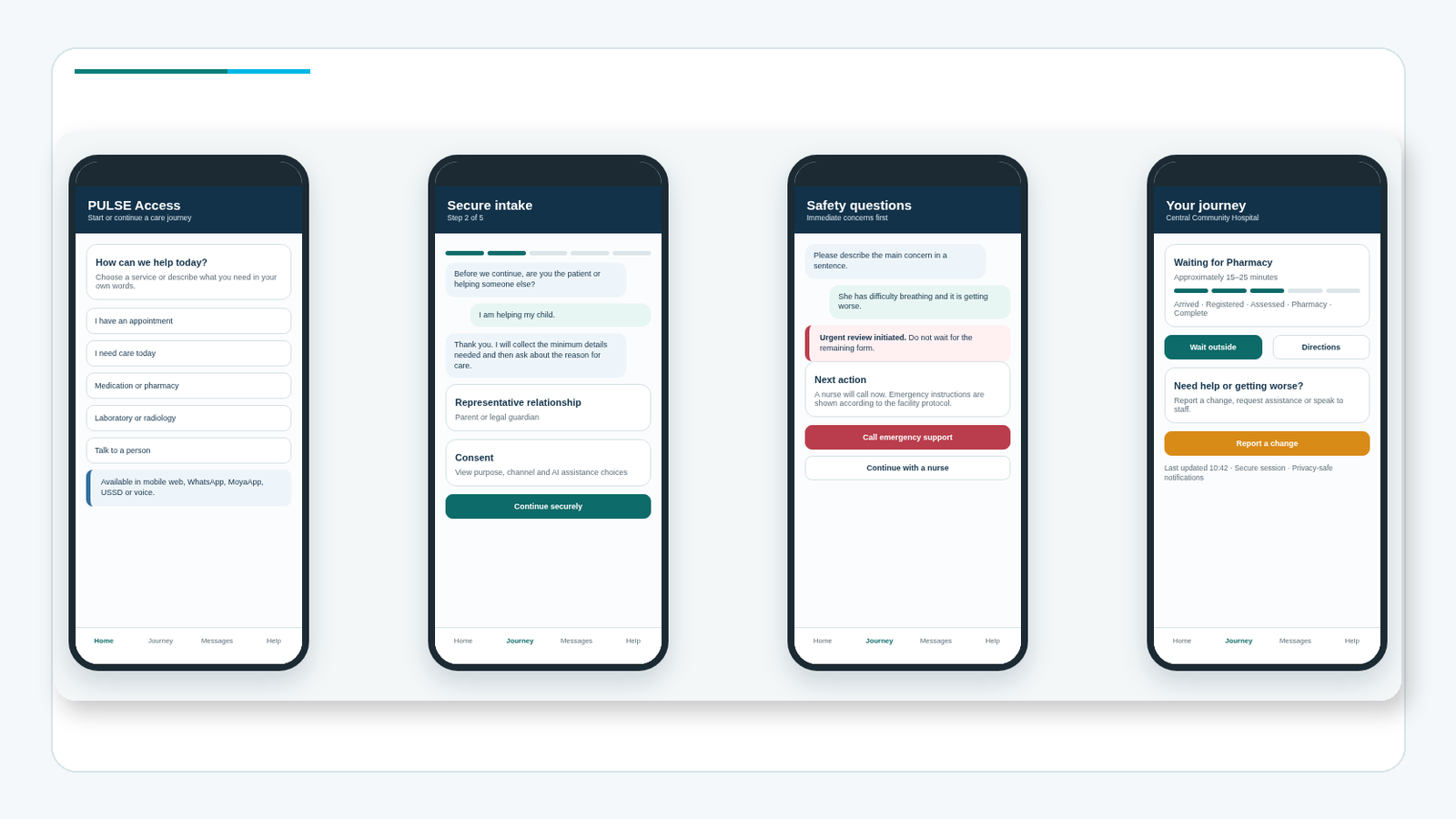
Representative concept — A digital and assisted route into one connected patient journey.
Access on the patient’s terms
Patients and authorised representatives can begin through a secure mobile or assisted route.
Immediate help remains visible
Urgent human-assistance and deterioration routes remain prominent and accessible.
The journey remains connected
Arrival, current stage, virtual waiting, communication and follow-up remain linked to the same operational journey.
What PULSE enables across the patient journey.
An orientation view of who a capability is typically relevant to. It does not imply every capability is active at every site, or that every user sees every capability.
| Capability | Patients & representatives | Access teams | Service teams | Supervisors & command | Executives | Technology & governance |
|---|---|---|---|---|---|---|
| Digital and assisted access | Not typically relevant | Not typically relevant | Not typically relevant | Not typically relevant | ||
| Journey orchestration | Not typically relevant | Not typically relevant | ||||
| Queue and virtual waiting | Not typically relevant | Not typically relevant | ||||
| Work ownership | Not typically relevant | Not typically relevant | Not typically relevant | |||
| Closed-loop hand-offs | Not typically relevant | Not typically relevant | Not typically relevant | |||
| Patient communication | Not typically relevant | Not typically relevant | Not typically relevant | |||
| Operational command | Not typically relevant | Not typically relevant | Not typically relevant | Not typically relevant | ||
| Verification and exceptions | Not typically relevant | Not typically relevant | Not typically relevant | |||
| Transfers and resources | Not typically relevant | Not typically relevant | Not typically relevant | Not typically relevant | ||
| Analytics | Not typically relevant | Not typically relevant | Not typically relevant | |||
| Integration | Not typically relevant | Not typically relevant | Not typically relevant | Not typically relevant | Not typically relevant | |
| Local continuity | Not typically relevant | Not typically relevant | Not typically relevant | |||
| Security and evidence | Not typically relevant | Not typically relevant | Not typically relevant | |||
| Governed AI | Not typically relevant | Not typically relevant | Not typically relevant | Not typically relevant |
Not every capability is active at every site. Not every site needs every module, uses AI or uses PULSE Edge.
Explore additional operational, administrative and analytical workspaces.
Connected to the same PULSE journey and Work Item foundation.
See one PULSE journey in action.
Follow a representative patient journey from access and arrival through owned work, operational visibility and closed-loop completion.
Representative concept — Step 1 of 6
Patient begins
The patient starts through mobile or assisted access and enters one controlled journey.
Representative product concepts using fictional data. Final workflows, interfaces, integrations and release scope depend on client evidence, governance and approved intended use.
Start with the need. Expand through one platform.
PULSE modules share the same journey, Work Item, event, evidence, role and configuration foundation. Filter by operational area, then expand any module for deeper detail.
Foundation
Key capabilities
- Patient Journey
- Work Items
- Workflow
- Roles and access
- Configuration
Main users
Platform administrators, operational governance, technology and all modules.
Status
Example journey
A patient arrival event creates a Work Item, routed through Core workflow to the responsible service, with every state change recorded as evidence.
Integration considerations
- PULSE Connect adapters
- Authorised identity providers
- All PULSE modules
Connection to PULSE Core
PULSE Core is the foundation — every other module extends its journey, Work Item, event and evidence model.
Foundational Operational Modules
Key capabilities
- Digital front door
- Assisted registration
- Pre-arrival capture
- Arrival
- Walk-in access
Main users
Patients, representatives, reception and access staff.
Status
Example journey
A patient completes pre-arrival capture online; on arrival, reception confirms identity and Access creates a journey Work Item in Core.
Integration considerations
- PULSE Engage (messaging)
- PULSE Verify (identity exceptions)
- Identity providers via PULSE Connect
Connection to PULSE Core
Access writes journey entries and Work Items into PULSE Core, so arrival becomes the start of one owned, evidenced journey.
Key capabilities
- Queue and journey state
- Work ownership
- Routing
- Claiming
- Priority
Main users
Reception, service teams, coordinators and supervisors.
Status
Example journey
A reviewed patient is routed to a service; Flow assigns the Work Item, the team claims it, and a closed-loop hand-off is evidenced in Core.
Integration considerations
- PULSE Resource (transfers)
- PULSE Command (live state)
- Service systems via PULSE Connect
Connection to PULSE Core
Flow operates on Core's Work Item and journey-state model, so every movement and hand-off is owned and auditable.
Key capabilities
- SMS
- Web status
- Virtual waiting
Main users
Patients, access teams, contact centres and operational teams.
Status
Example journey
A patient receives a reminder, replies with a question, and the response creates a communication Work Item linked to their journey in Core.
Integration considerations
- Messaging providers via PULSE Connect
- PULSE Access (arrival updates)
- PULSE Flow (journey state)
Connection to PULSE Core
Engage attaches communication events and consent state to the Core journey, so messaging is part of the operational record.
Key capabilities
- Demand
- Journey state
- Wait risk
- Work backlog
- Unowned work
Main users
Command centres, supervisors, operational leaders and executives.
Status
Example journey
A supervisor sees wait risk rising for a service, identifies unowned work, and intervenes before the patient is delayed.
Integration considerations
- All operational modules (read views)
- PULSE Insight (trends)
- PULSE Core (events and evidence)
Connection to PULSE Core
Command reads Core's live journey, Work Item and event state to present one shared operational truth.
Extension Modules
Key capabilities
- Evidence requests
- Exception ownership
- Verification workbench
- Provider integration
- Audit support
Main users
Access, finance, verification and administration teams.
Status
Example journey
An identity exception at arrival becomes a Verify Work Item; the access team resolves it and hands the journey back to Flow.
Integration considerations
- Eligibility and identity providers via PULSE Connect
- PULSE Access (exceptions)
- PULSE Core (evidence)
Connection to PULSE Core
Verify uses Core Work Items and evidence, so exceptions are owned, resolved and auditable rather than lost in queues.
Key capabilities
- Resource status
- Transfer Work Items
- Receiving confirmation
- Room and service coordination
- Escalation
Main users
Bed managers, transfer teams, service coordinators and command centres.
Status
Example journey
A transfer is requested as a Resource Work Item; the receiving service confirms readiness, and the closed-loop hand-off is recorded in Core.
Integration considerations
- PULSE Flow (movement)
- PULSE Command (capacity)
- Resource systems via PULSE Connect
Connection to PULSE Core
Resource models transfers and capacity as Core Work Items, so coordination is owned and evidenced end to end.
Key capabilities
- Operational trends
- Demand forecasting
- Anomaly detection
- Journey analysis
- Service comparison
Main users
Operational leaders, data teams, programme teams and executives.
Status
Example journey
A programme team reviews demand forecasts and journey analysis to plan service capacity, grounded-sm in Core evidence.
Integration considerations
- PULSE Core (events and evidence)
- PULSE Command (live views)
- Reporting and warehouse systems via PULSE Connect
Connection to PULSE Core
Insight is built on Core's versioned events and evidence, so analytics reflect the same operational truth teams act on.
Key capabilities
- Local essential work
- Local journal
- Controlled synchronisation
- Reconciliation
- Conflict handling
Main users
Facilities, local operations, service continuity and technology teams.
Status
Example journey
During a connectivity loss, a site continues approved essential work locally; on reconnection, Edge reconciles the local journal with Core.
Integration considerations
- PULSE Core (synchronisation)
- Local facility systems
- Monitoring and recovery tooling
Connection to PULSE Core
Edge extends Core's Work Item and event model locally, then reconciles back to the central record when connectivity returns.
Not every module is required at every site. Final sequencing depends on the client problem, site readiness, providers and intended use.
Replaceable, governed integration.
PULSE uses replaceable, governed adapters and contracts to integrate with authorised systems — so integrations can evolve without rebuilding the platform.
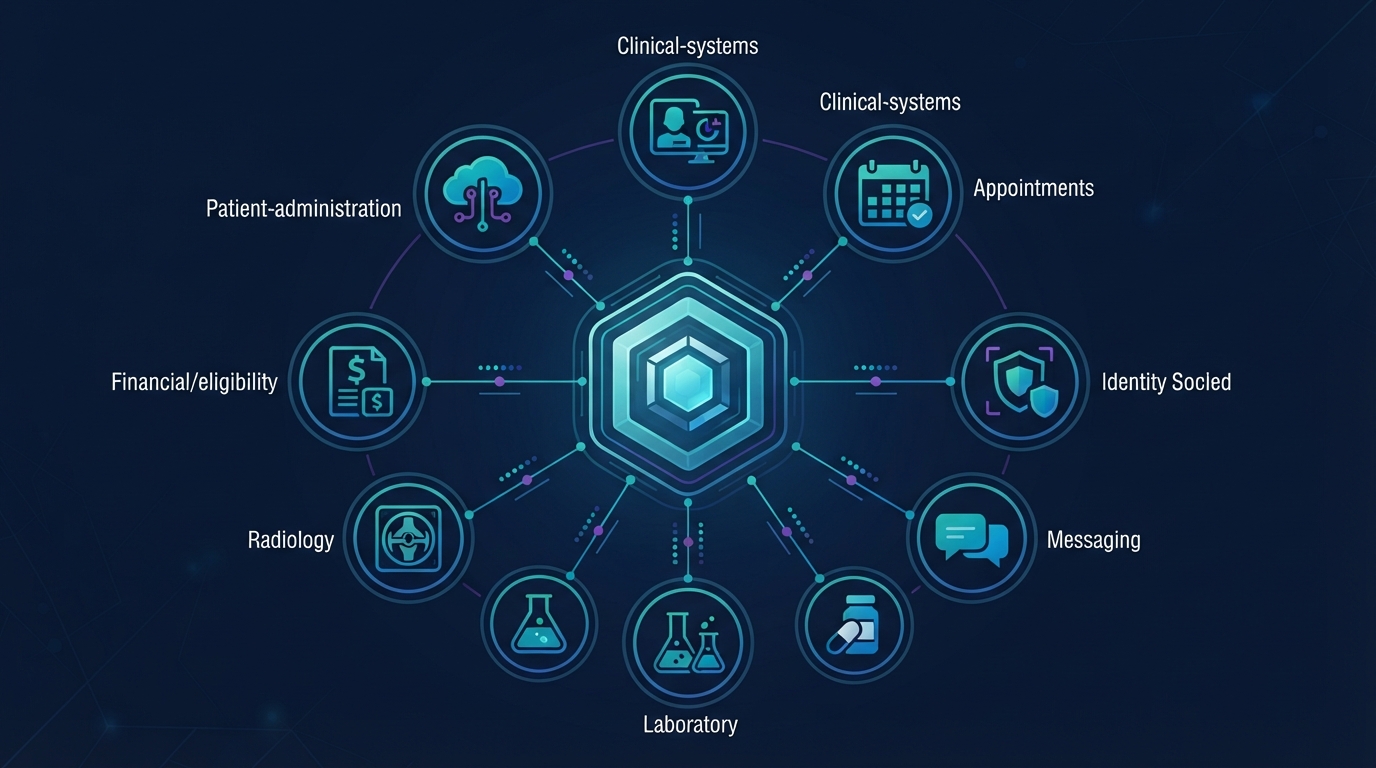
Integration principles
Centralised control. Local continuity where required.
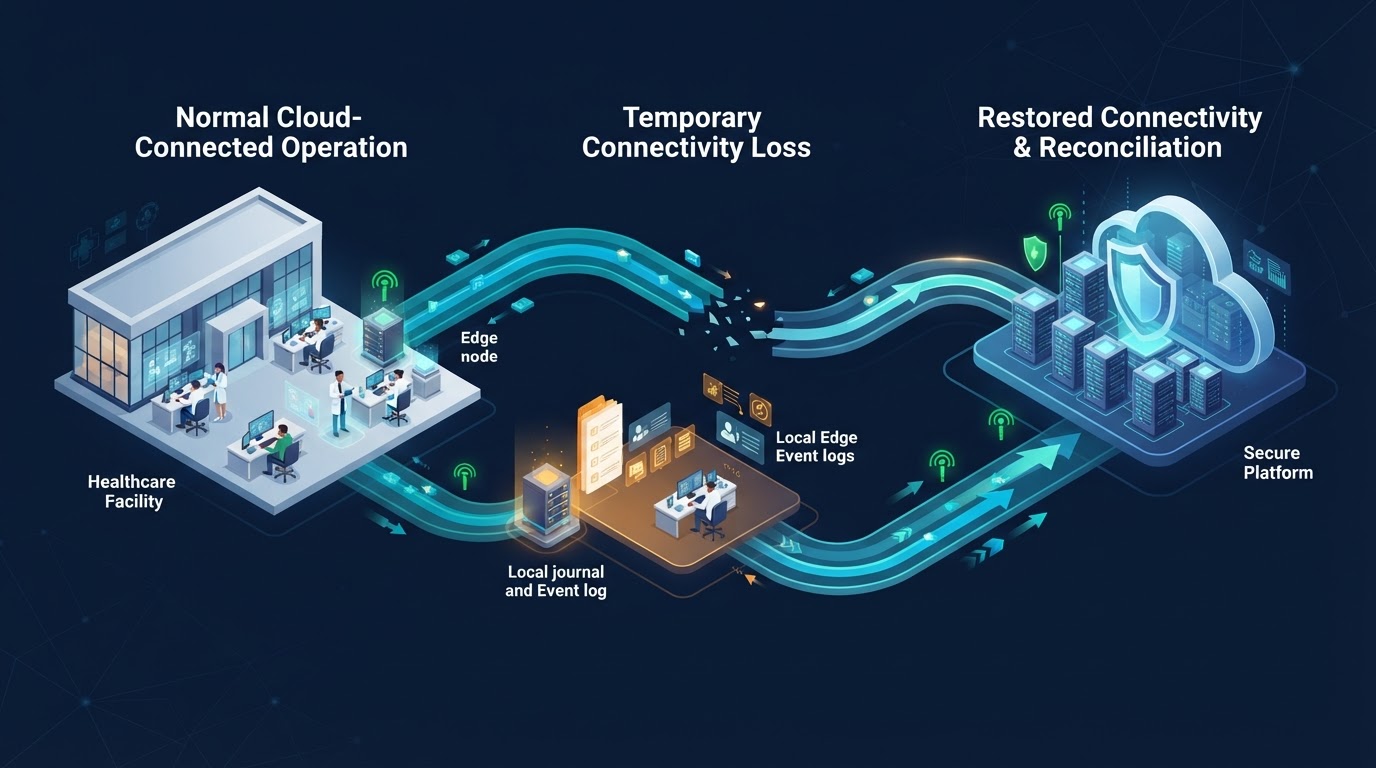
Cloud-connected model
The normal operating model is cloud-connected: experiences, modules, core and connectors run as governed services, with monitoring and recovery managed centrally.
PULSE Edge
For facilities where continuity requirements justify it, PULSE Edge can preserve approved essential local operational functions and reconcile when connectivity returns.
Not every facility requires Edge. It is an option for sites where local continuity is a stated requirement.
Six principles that shape the platform.
Web-first
Use modern web access and existing devices where practical.
Modular
Activate capabilities progressively.
Server-authoritative
Protect operational state through governed services.
Interoperable
Connect through controlled contracts.
Evidence-led
Make state, ownership and acceptance visible.
Resilient
Design for monitoring, recovery and degraded operation.